Client Onboarding Automation That Starts Every New Client the Same Way
Connected welcome messages, forms, tasks, reminders, and status updates move a new client from agreement to ready-to-serve, with clear ownership and sensitive records kept where they belong.
What Client Onboarding Automation Means in Plain Language
Client onboarding automation connects the steps that move a new client from a signed agreement to ready-to-serve into one sequence. Instead of recreating the same welcome email, setup tasks, and reminders by hand for every new client, the workflow sends the right message, assigns the right task, and updates the right status at the right time, with a person reviewing at each step.
RJ Semaj Solutions separates what the client does from what your team does, keeps sensitive records in the secure industry systems where they belong, and adds clear consent language to every form. We do not guarantee revenue, conversions, or retention, and we never collect sensitive tax, banking, medical, or identity information through general onboarding forms.
Who This Is a Good Fit For
Client onboarding automation is a good fit for businesses whose new-client process depends on repeated manual emails, scattered forms, staff memory, or inconsistent handoffs.
- A business that sends the same welcome email by hand for every new client
- A business whose setup tasks live in one person's memory
- A business that collects onboarding details across scattered emails
- A business with several handoffs between team members during setup
- A business that wants a consistent start for every new client
Who May Not Need It Yet
Onboarding automation is not always the right first step. You may not need it right now if any of these are true.
- You onboard very few new clients and a simple checklist is enough
- Your onboarding is a single step with no handoffs
- You want a guarantee of revenue, conversions, or retention, which we do not provide
- You need to collect sensitive records that belong in a secure industry system
Common Needs We Help With
These are the everyday onboarding problems small businesses bring to us. We address them with a connected workflow and clear ownership, not fear or exaggerated promises.
Delayed starts
A new client signs on and then waits, because no one has a reliable next step ready for them.
Missing information
The details needed to start the work are collected piecemeal across emails, so something is always missing.
Duplicated work
The same welcome email and setup tasks are recreated by hand for every new client, wasting time and inviting mistakes.
Confused customers
New clients are not sure what to do next or where things stand, so they call to ask or quietly disengage.
Incomplete tasks
Setup steps depend on one person remembering them, so some get done and others quietly slip through.
Limited visibility
There is no easy way to see which new clients are on track and which are stuck, so problems surface late.
The RJ Semaj Solutions Approach
We map the current process, separate customer and internal actions, define required information and security boundaries, build the sequence, assign ownership, test exceptions, and train the team. We explain technology in plain language, recommend only the tools that fit your needs, separate each client's information, include human-review points, and test systems before launch.
AI may support drafting and production, but it does not replace professional review or your approval. Every customer-facing message is checked by a person and approved by you before it goes out, and decisions that need judgment keep a human-review point.
The Two-Lane Onboarding Map
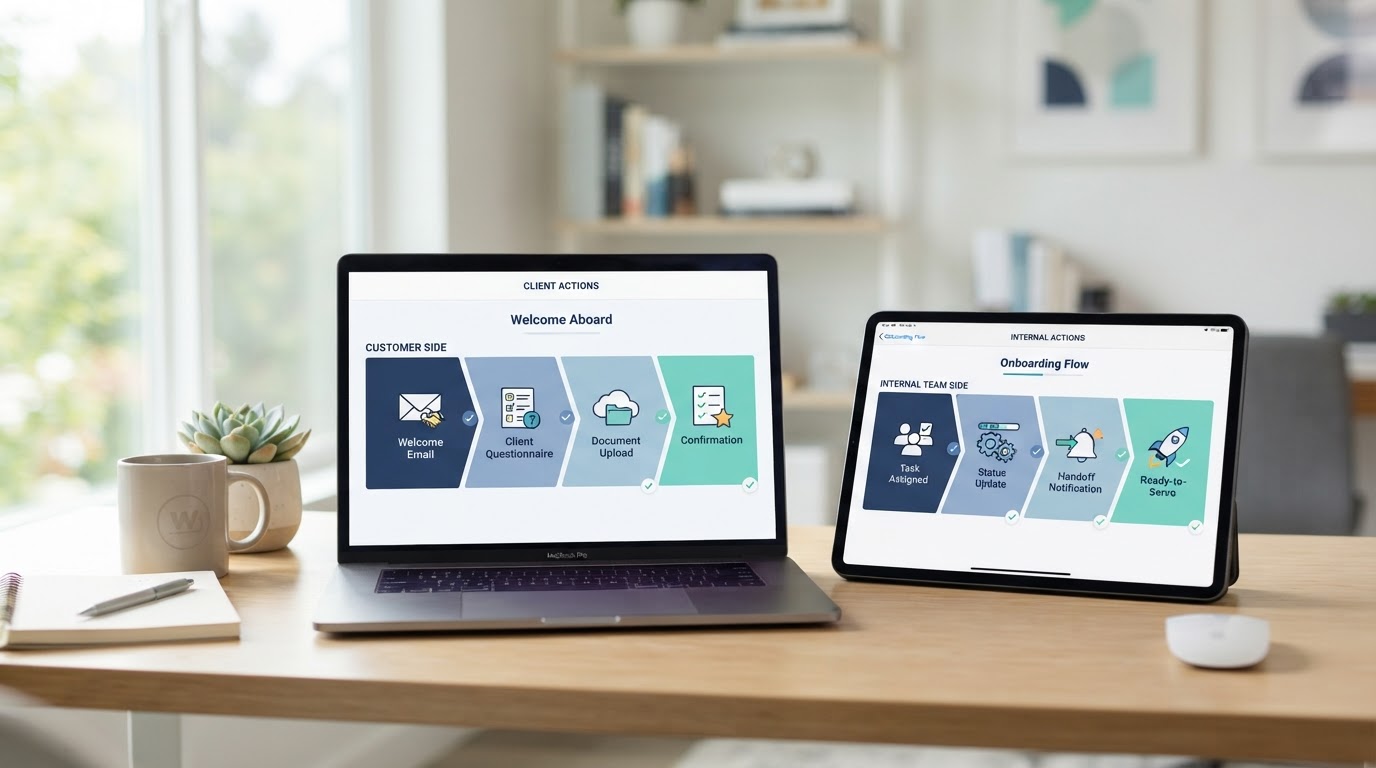
New clients move through two lanes at once: what they do and what your team does. This is an illustrative map, not a real client record. We build the lanes around your real process, and every message is approved by you first.
Customer Actions
- 1
Welcome Message
An automatic, friendly welcome goes out the moment an agreement is signed, so the new client knows what happens next and is not left waiting.
- 2
Onboarding Form
The client completes a short form that collects only the information needed to start, with clear consent language and no sensitive records.
- 3
Reminders and Updates
Consent-based reminders keep the client moving, and status updates let them see where things stand without calling to ask.
- 4
Ready to Serve
The client receives a clear notice that onboarding is complete and what to expect next, so the relationship starts on solid ground.
Internal Team Actions
- 1
Account Created
The team is notified and a record is created in the CRM with the agreed details, so nothing about the new client is held in one person's memory.
- 2
Information Reviewed
A person reviews what came back, flags anything missing, and decides the next step before the client is asked again.
- 3
Tasks and Handoffs
Internal tasks are assigned with owners, and handoffs happen with the context attached, so the right person picks up the next step.
- 4
Status Confirmed
Onboarding status is marked complete, the record is updated, and the client moves into delivery with everything in place.
The two lanes are built around your real process, not this example. Each internal step has an owner, and exceptions are tested before launch.
What Connected Onboarding Gives You
These are operational and customer-experience benefits. We do not promise revenue, conversions, retention, or any business result.
A consistent start for every client
Each new client moves through the same clear steps, so the experience is steady instead of dependent on who remembers what.
Less manual repetition
Welcome messages, forms, reminders, and handoffs are connected, so your team stops recreating the same work by hand.
Clear ownership
Every internal step has an owner and the context attached, so handoffs happen cleanly instead of falling between people.
Visible status
You can see where each new client stands without chasing emails, so problems surface early instead of late.
Sensitive records kept where they belong
General forms collect only what is needed to start, and sensitive records stay in the secure industry systems designed for them.
Personal where it counts
Automation handles the repetitive parts so your team can focus on the personal touch, with human-review points throughout.
How Onboarding Automation Unfolds
Six steps from mapping your current process to launching an approved workflow. The exact timeline depends on your scope and how quickly approvals move, and is shared in your proposal before work begins.
- 1
Map the Current Process
We walk through how a new client moves through your business today, so the automation reflects your real steps instead of a generic template.
- 2
Separate Customer and Internal Actions
We split what the client does from what your team does, so each lane has clear ownership and nothing falls between two people.
- 3
Define Information and Security Boundaries
We agree what information is collected, keep sensitive records in the secure industry systems where they belong, and add clear consent language.
- 4
Build the Sequence
We build the welcome messages, forms, tasks, reminders, and status updates into one connected sequence, with human-review points throughout.
- 5
Assign Ownership and Test Exceptions
We assign owners to each internal step and test what happens when something is missing or goes wrong, so the workflow handles real situations.
- 6
Train the Team and Launch
We walk your team through managing and adjusting the workflow, then launch only after you approve it and every step has been tested.
Possible Onboarding Scopes
These describe common scopes so you can think about what fits. Prices, inclusions, and revision limits are defined in your written proposal after we understand your needs. We do not publish prices here, and no revenue or result is guaranteed. Secure industry systems remain the proper location for sensitive records.
Basic welcome sequence
An automatic welcome message and a short onboarding form get a new client started without the usual delay. Suited to a business with a simple onboarding process that still depends on manual emails.
Structured multi-step onboarding
A connected sequence of welcome messages, forms, internal tasks, reminders, and status updates moves a new client from agreement to ready-to-serve. Suited to a business whose onboarding has several steps and handoffs.
Onboarding workflow management
After launch, the onboarding workflow is managed and adjusted as your process evolves, with changes covered by the support terms in your agreement. Suited to a business that wants onboarding to keep improving over time.
What We Ask of You
A connected onboarding workflow depends on a few things from your side.
- Walking us through your current onboarding process so the automation reflects your real steps
- Deciding what information is collected and keeping sensitive records in the secure systems where they belong
- Approving every customer-facing message so it sounds like your business
- Assigning owners to internal steps and deciding how exceptions are handled
- Granting access to your CRM and tools only when needed and as agreed in your proposal
- Reviewing and approving the workflow before it launches
Honest Limitations
Clear terms are part of every project. Here is what we do not promise.
- We do not guarantee revenue, conversions, retention, or any business result
- Sensitive tax, banking, medical, and identity records belong in secure industry systems, not general onboarding forms
- We do not provide legal, compliance, or security advice; consult a qualified professional for those requirements
- Automation handles repetitive handoffs and reminders; decisions that need judgment keep a human-review point
- Project timelines depend on your scope, access, and how quickly approvals move
- Platform, phone, email, text, and usage charges from third-party tools are separate from our service fee and are disclosed in your proposal
Related Services and Logical Next Steps
Onboarding works best on organized contacts, with timely follow-up and a way for new clients to book their first appointment. These services pair naturally with client onboarding automation.
CRM Setup and Contact Organization
Onboarding records belong in an organized CRM. Set up your contacts first so each new client has a clear, complete record.
Automated Lead Follow-Up
Consent-based follow-up keeps a new client moving between onboarding steps instead of waiting in silence.
Appointment Booking Systems
Connect onboarding to booking so a new client can schedule their first appointment as part of the welcome flow.
Client Onboarding Automation Questions
Practical answers about what can be automated, staff tasks, forms, sensitive data, exceptions, status tracking, changes after launch, and customer experience.
Give Every New Client the Same Strong Start
Schedule a free business growth assessment. We will review your current onboarding process and what a connected workflow could look like for your business. No obligation.
Mon - Fri: 8:00 AM - 1:00 PM CT · Appointments outside these hours may be available by request.